
Screen Video Recorder Flash1.5.34.0 - Download
You'll be able to download in few seconds.
Publisher Description
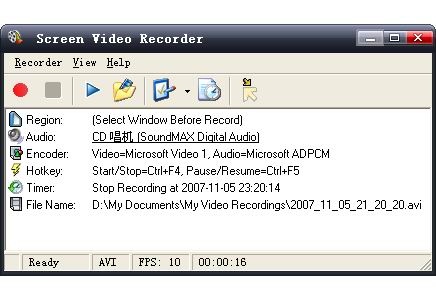
Screen Video Recorder is an easy-to-use, fast, and powerful video-recording software. You can use this screen capture software to record full screen or any area of the desktop screen to SWF/FLV, and you can record audio and mouse cursor's movement.
It can be used to record web cams from AIM, ICQ, MSN Messenger, Yahoo Messenger, or capture movies from TV card, DVD, RM, VCD, MPEG. It also facilitates making slide show training documents.
The key features of Screen Video Recorder are listed below:
* Record activities of full screen or part of screen into SWF or FLV file
* Fast speed and Very Easy to use
* Support recording audio
* Support recording mouse cursor
* Support 5 capture types: random region, window, full screen, fixed size, fixed region
* Support pause/resume recording
* Support auto save recordings
* Support user defined file name format
* Support record timer to stop recording automatically
* Support blinking when recording
* Support customed hotkey to start or stop recording quickly
* Video/Audio codec choosable, you can select any available video/audio codec from your computer
* Support hide on recording, window can be minimized to icon in system tray
* Support Multi-Language interface
About Screen Video Recorder Flash
This Screen Capture program is available in English, Arabic, ChineseSimplified, Japanese, Portuguese, Turkish. It was last updated on 29 September, 2026. Screen Video Recorder Flash is compatible with the following operating systems: Windows.
The company that develops Screen Video Recorder Flash is WORDADDIN STUDIO. The latest version released by its developer is 1.5.34.0.
The download we have available for Screen Video Recorder Flash has a file size of 9.4 MB. Just click the green Download button above to start the downloading process. The program is listed on our website since 2010-02-28 and was downloaded 0 times. We have already checked if the download link is safe, however for your own protection we recommend that you scan the downloaded software with your antivirus. Your antivirus may detect the Screen Video Recorder Flash as malware if the download link is broken.
How to install Screen Video Recorder Flash on your Windows device:
- Click on the Download button on our website. This will start the download from the website of the developer.
- Once the Screen Video Recorder Flash is downloaded click on it to start the setup process (assuming you are on a desktop computer).
- When the installation is finished you should be able to see and run the program.
Program Details
General
System requirements
Download information
Pricing
Version History
version 1.5.34.0
posted on 2010-02-28
Added full compatibility for Windows 7; Added no video compressor support in AVI mode; Added user defined file name format support; Added \"Copy File Name to Clipboard\" and \"Copy Folder Name to Clipboard\"; Added tips for setting audio volume and audio source; Added FLV play control in Easy Flash Player (Gold and Flash version only); Removed \"Next Time Only\" mode in Computer Usage Log for compatibility reasons; Fixed getting flash dimension issue in Easy Flash Player (Gold and Flash version only); Fixed the problem that may cause recording blank after pause/resume operation; Fixed cursor blinking problem during recording; Fixed getting input volume issue in multi mixer system; Other minor fixes and tweaks.
Disclaimer
External Download
We do not host Screen Video Recorder Flash on our servers. We did not scan it for viruses, adware, spyware or other type of malware. This app is hosted by the software publisher and passed their terms and conditions to be listed there. We recommend caution when installing it.
The external download link for Screen Video Recorder Flash is provided to you by apps112.com without any warranties, representations or guarantees of any kind, so access it at your own risk.
If you have questions regarding this particular app contact the publisher directly. For questions about the functionalities of apps112.com contact us.
